
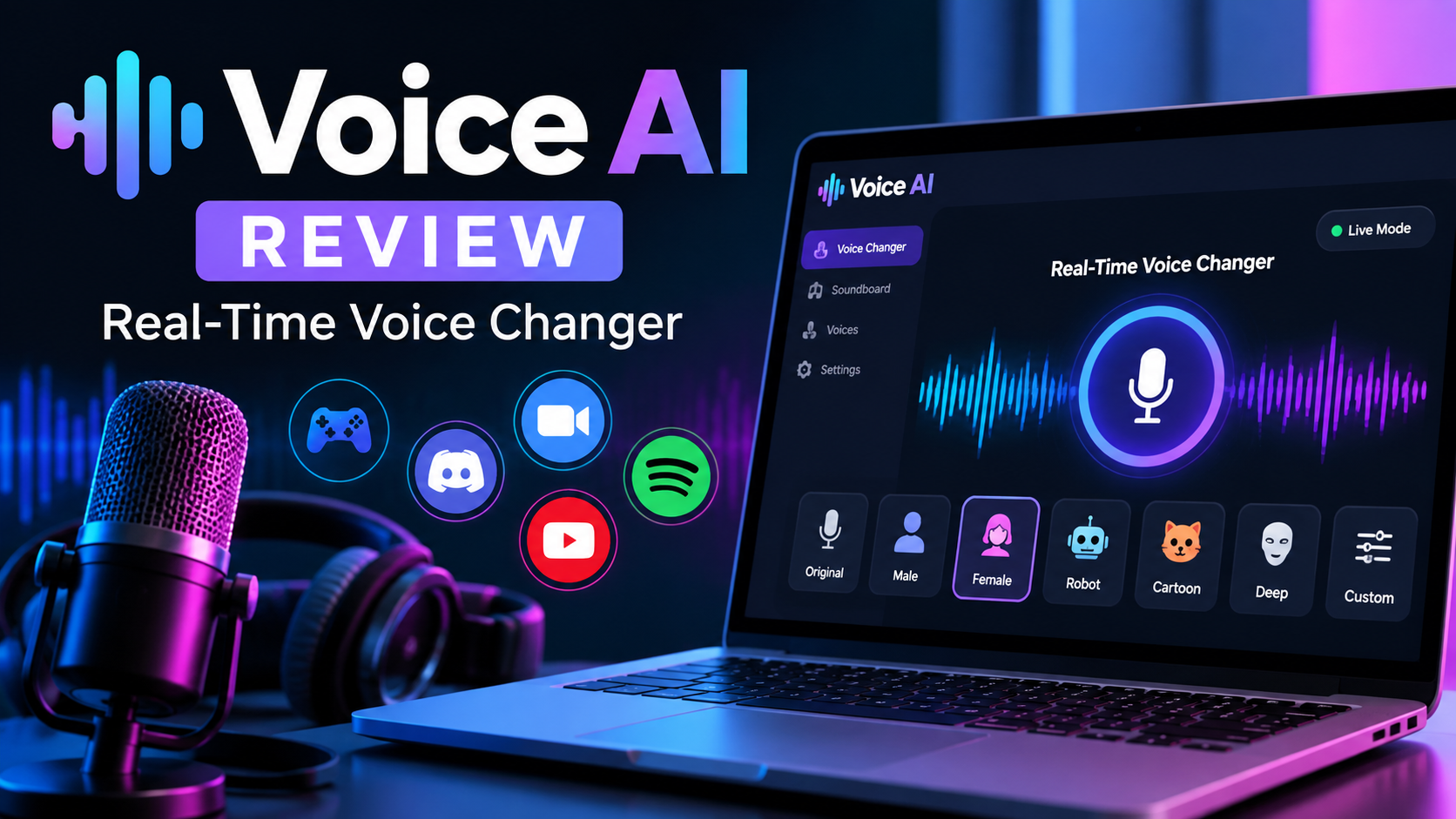
Voice changing tools have moved well beyond the novelty pitch-shifters of a decade ago. Today’s AI voice platforms promise realistic, real-time transformation that works inside games, calls, and livestreams — not just pre-recorded audio. Voice AI is one of the more talked-about names in this space, combining a real-time voice changer, voice cloning, and text-to-speech generation in one platform.
This review breaks down what Voice AI actually does, how well it performs, what it costs, and whether it’s the right pick for your workflow.
What Is Voice AI?
Voice AI is a voice transformation and generation platform built around three core capabilities: changing your voice in real time, cloning a voice from a sample, and generating synthetic speech from text. It’s designed to plug into whatever app is already capturing your microphone — Discord, Zoom, a game client, or streaming software — rather than requiring a separate recording workflow.
The platform runs across desktop (Windows and Mac) and mobile (iOS and Android), though not every feature is available on every platform. The desktop app tends to be the most fully featured, since it’s built specifically for live voice changing during gaming and streaming sessions.
How Voice AI Works
At a technical level, Voice AI sits between your microphone and whatever application receives your audio. It intercepts your voice input, runs it through a trained voice model, and outputs the transformed audio to a virtual microphone that other apps can pick up.
The general workflow looks like this:
- Install the app and set up the virtual audio device it creates.
- Select a voice from the built-in library or a cloned/custom model.
- Route your microphone input through the Voice AI virtual device.
- Speak normally — the software converts your voice in near real time.
- Fine-tune settings like pitch, latency, and output volume for the app you’re using.
Because the conversion happens on the fly, there’s a small amount of processing latency. On a modern computer, this is usually low enough to feel natural in conversation, though it can be noticeable on older hardware or with high-quality voice models.
Key Features
Real-Time Voice Changer
This is the platform’s headline feature. It lets you speak in a completely different voice while gaming, on a call, or streaming live, with no need to pre-record anything.
Voice Cloning
Users can upload audio samples to build a custom voice model that mimics a specific voice. This is popular with content creators who want a consistent “character” voice across videos or streams.
AI Voice Generation (Text-to-Speech)
Beyond real-time conversion, Voice AI includes text-to-speech tools for generating spoken audio from written scripts — useful for voiceovers, narration, and video content where live recording isn’t practical.
Community Voice Library
A large collection of user-submitted and preset voices is available, ranging from character-style voices to more natural, realistic tones. This saves time for users who don’t want to build a custom model from scratch.
Soundboard Integration
Short custom voice clips can be saved and triggered on demand, which is a popular feature among streamers who like to drop in sound effects or one-liners during broadcasts.
Voice Generation Quality
Voice quality is where these platforms tend to be judged most harshly, and results here are mixed but generally solid for the intended use case.
- Real-time changed voices sound convincing for casual use — gaming, chatting, and streaming — though close listening can sometimes reveal artifacts, especially with more dramatic pitch or tone shifts.
- Cloned voices vary depending on the quality and length of the source audio. Clean, longer samples produce noticeably better results than short or noisy clips.
- Text-to-speech output tends to sound more polished than real-time conversion, since it isn’t constrained by the same latency requirements.
In short, don’t expect broadcast-studio perfection from the real-time changer, but the quality is more than adequate for entertainment, gaming, and casual content creation.
Supported Use Cases
Voice AI is built with a fairly specific audience in mind, and it shows in where it performs best:
- Gaming — adding a different voice persona during multiplayer sessions
- Streaming and VTubing — maintaining a character voice on camera or audio-only
- Content creation — generating voiceovers for videos without recording new dialogue
- Prank calls and casual fun — quick, low-stakes voice changing
- Accessibility and privacy — masking a natural voice during calls or recordings when anonymity is preferred
It’s less suited to professional-grade production work, such as commercial voiceover or audiobook narration, where studio-level consistency and licensing clarity typically matter more.
Pricing and Plans
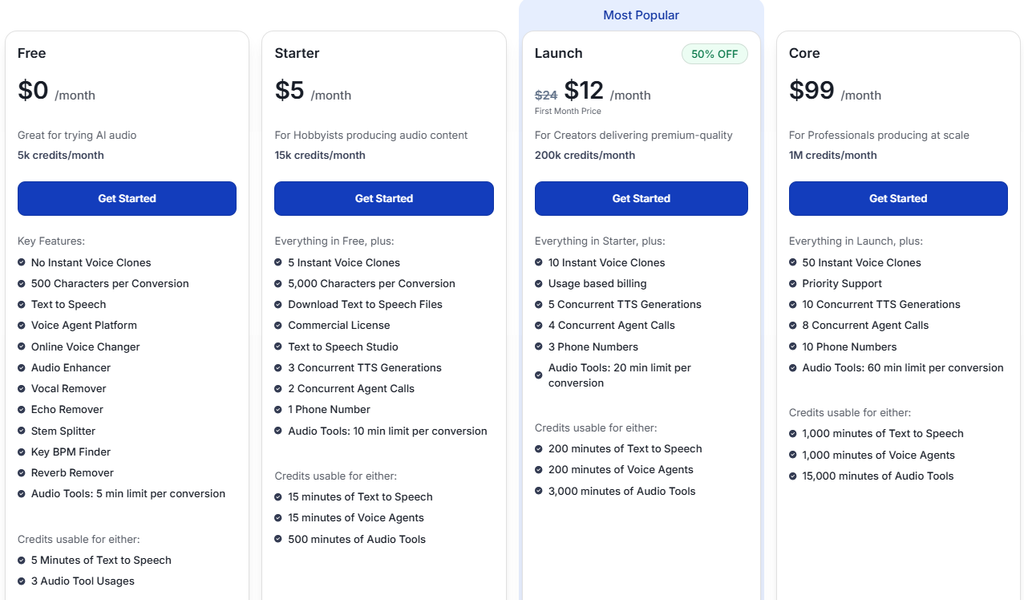
Voice AI follows a freemium structure. The core real-time voice changer is available at no cost, which makes it easy to try before committing to anything.
Paid tiers unlock:
- Access to premium or higher-fidelity voice models
- Additional credits for voice cloning and generation
- Expanded voice-slot limits
- Priority processing or reduced latency in some cases
Because Voice AI spans desktop, mobile, and web products, pricing and feature availability can differ depending on which version you’re using. It’s worth checking the current plan details directly before subscribing, since credit-based systems and voice-slot allowances tend to change more often than flat subscription tiers.
Ease of Use
Setup is straightforward for anyone comfortable installing desktop software and adjusting audio input/output settings. The core loop — pick a voice, route your mic, start talking — takes just a few minutes to configure.
That said, a few friction points are common:
- Virtual audio devices sometimes need manual selection inside other apps (Discord, OBS, game clients).
- First-time setup may require troubleshooting mic permissions or driver conflicts.
- Advanced features like voice cloning have a slightly steeper learning curve than the basic changer.
Overall, most users report getting the real-time changer working within one session, with occasional extra steps needed for more advanced routing setups.
Pros and Cons
Pros:
- Free tier covers the core real-time voice changing experience
- Large, actively growing library of community voices
- Voice cloning available for custom, repeatable characters
- Works across popular gaming, call, and streaming apps
- Multi-platform support (desktop and mobile)
Cons:
- Feature availability is inconsistent across platforms
- Advanced tools (cloning, premium voices) require credits or paid plans
- Real-time voice quality can vary by model and hardware
- Initial audio routing setup isn’t always plug-and-play
Alternatives to Consider
If Voice AI doesn’t fit your exact needs, a few comparable options are worth researching:
- Clownfish Voice Changer — a lightweight, free option for basic real-time pitch changes
- ElevenLabs — stronger focus on high-fidelity text-to-speech and voice cloning for content production
- MorphVOX — an established real-time voice changer aimed at gamers
- Resemble AI — geared toward developers and businesses needing voice API integration
Each of these trades off differently between real-time performance, voice realism, and production-grade use cases, so the right pick depends on whether you prioritize live conversion or studio-quality output.
Who Is Voice AI Best For?
Voice AI is best suited to gamers, streamers, VTubers, and casual content creators who want an easy way to add a different voice to live interactions. It also appeals to anyone experimenting with voice cloning for fun projects or looking for a low-cost way to generate voiceovers without a microphone setup.
It’s less ideal for professionals needing consistent, license-clear voice assets for commercial production, where more specialized platforms may be a better fit.
Final Verdict: Is Voice AI Worth It?
Voice AI delivers on its core promise: a genuinely usable real-time voice changer, backed by voice cloning and text-to-speech tools, wrapped into a single accessible platform. The free tier is generous enough to properly test the experience before spending anything, and the community voice library adds variety that many competitors lack.
Where it falls short is consistency — voice quality and feature access can shift depending on the platform and model you’re using. For casual, entertainment-focused use, though, Voice AI is a solid, low-barrier option worth trying.
Leave a Reply